Rent ledger
The rent ledger charges rent on agreements the council lets out, records payments from the finance system, and shows what each tenant owes. It is an optional module: an administrator switches it on in settings. When it is on, Rents appears in the menu.
Who can see and do what
What you see depends on your access areas. Finance staff and administrators see every account. People in the Estates area see rent and arrears for their own patch: the properties they manage, those of everyone they supervise, and anyone they are covering for. Raising rent, credit notes and the finance export are for administrators and finance officers.
Who raises the invoices
Councils work in one of two ways, chosen in settings:
| Setting | What happens |
|---|---|
| PHAEMA numbers the invoices | Each charge gets an invoice number from PHAEMA (for example PH000123). The finance system records the invoices and collects the money. |
| The finance system raises the invoices | PHAEMA works out what is due and sends it to finance with its own reference (for example PHC000123). Finance raises and numbers the invoices. |
Either way, the finance export is how charges reach the finance system, and receipts come back the same way.
Raising rent
Administrators and finance officers: select Rents, then Raise rent.
- Choose the range of payment dates to charge, for example the next quarter, and the issue date.
- Select Preview the charges. PHAEMA lists every charge due between the dates on current and holding-over agreements let out by the council.
- Check the list and select Raise these charges.
How PHAEMA works out each charge:
- Rent is due in advance on each payment date, from the agreement's rent frequency (quarter days, other quarterly dates, monthly or annually).
- The amount is the annual rent in force on the first day of the period, from the rent schedule, divided by the number of payments a year.
- Part periods are apportioned by day (annual rent × days ÷ 365). This happens when an agreement starts between quarter days, which is charged from the start date to the day before the first quarter day, or when it ends part way through a period.
- VAT is added at the standard rate where the agreement is marked VAT chargeable (the council has opted to tax).
- Agreements at a peppercorn or no rent, and agreements where the council is the tenant, are not charged.
- When the service charge module is on, the same run also charges service charges on account. Choose Rent only, Service charges only, or both.
- Rent for a period is only ever charged once, so runs can overlap without charging twice.
Charges cannot be deleted. Correct a mistake with a credit note.
Rent accounts and statements
Each agreement has a rent account, which you can open from the agreement's page, the arrears list or the receipts list. It shows every charge and payment in date order with a running balance, and marks what is still owed on each charge, and whether it is overdue.
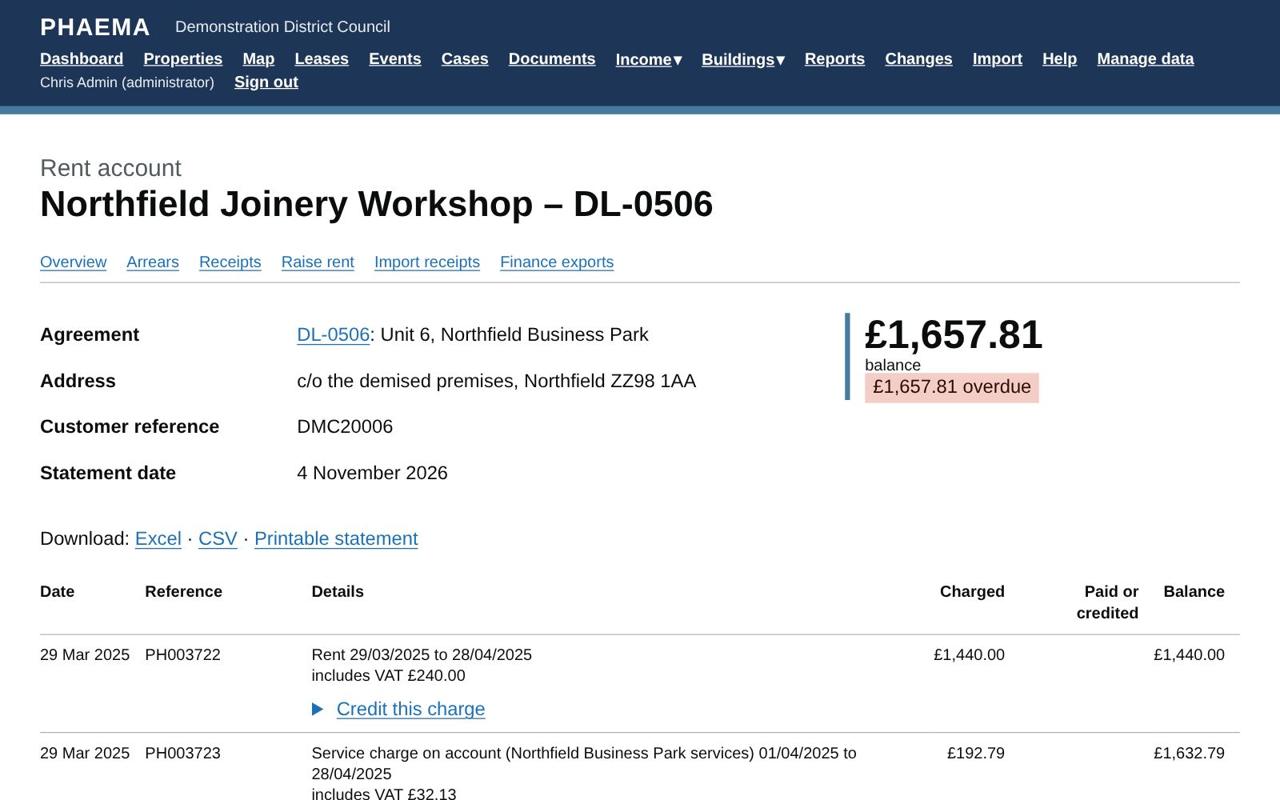 A rent account with its running balance.
Payments are set against the oldest debt first. The account can be downloaded to Excel or CSV, or opened as a printable statement to send to the tenant.
A party's page shows the balance of each of their agreements.
Credit notes
Administrators can credit a charge, in full or in part, from the rent account: open Credit this charge, enter the amount (or leave it blank for the whole charge) and a reason. VAT is credited in proportion. A credit note gets an invoice number in the same series and goes to finance in the next export.
Receipts
Payments are recorded in the finance system and imported into PHAEMA. Administrators and finance officers: select Rents, then Import receipts, and follow the usual import steps.
Each payment is matched to an agreement by, in order:
- the lease reference, if given;
- the invoice reference the payer quoted, which can be a PHAEMA invoice number or PHC reference;
- the customer reference, but only if that customer has a single agreement.
Payments already in PHAEMA (same payment reference) are left alone, so importing the same file twice is safe. A negative amount records a refund or a returned payment.
Arrears
Rents, then Arrears, lists every agreement with overdue rent, aged by how long it has been overdue: 1–30 days, 31–60 days, 61–90 days and over 90 days. Download it to Excel for arrears meetings. The dashboard shows the total arrears and the collection rate.
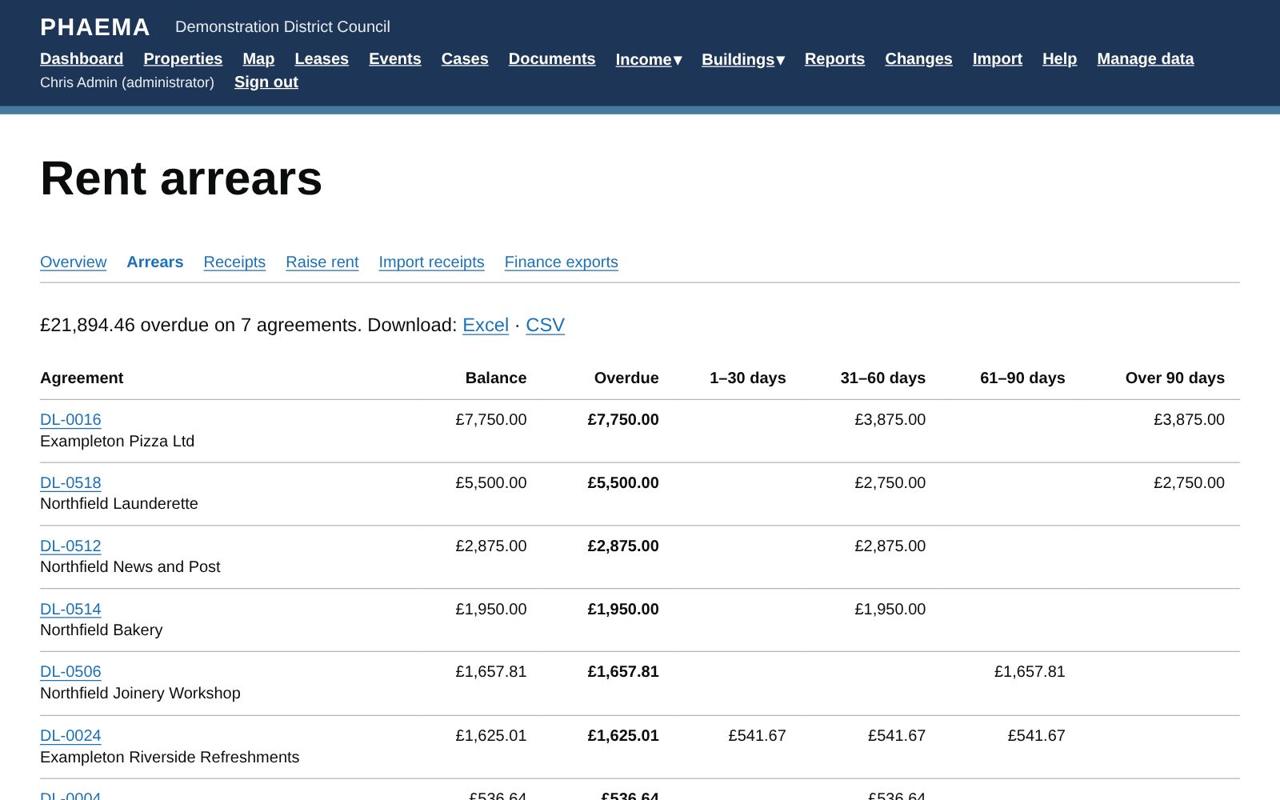 Arrears, aged.
The collection rate is the rent received in the last 12 months as a percentage of the rent that fell due in the same period.
The finance export
Rents, then Finance exports, collects every charge and credit note not yet sent to finance into a numbered export. Download it as Excel or CSV and load it into the finance system. Each charge is only ever in one export, and earlier exports can be downloaded again.
The columns are fixed, so the finance team can map them once:
| Column | Contents |
|---|---|
| Record type | Invoice or Credit note. |
| PHAEMA reference | PHAEMA's unique reference for the charge (PHC…). |
| Invoice number | PHAEMA's invoice number, if PHAEMA numbers invoices. |
| Credit for | For a credit note, the invoice it credits. |
| Customer reference, name, address | From the party. The customer reference is the party's finance customer reference. |
| Lease reference, Premises, UPRN | The agreement and its properties. |
| Description, Period from, Period to | What the charge is for. |
| Issue date, Due date | |
| Net, VAT code, VAT rate, VAT, Gross | Amounts in pounds; credit notes are negative. The VAT codes are set in settings. |
| Income code | The rent or service charge income ledger code set in settings. |
Other reports
The report builder has Rent charges and Rent receipts datasets, for example to list the rent charged on one estate, or the charges still waiting to go to finance.
Worked example
Northfield Joinery Workshop (DL-0506) pays £14,400 a year monthly in advance, plus VAT: £1,440 a month. Its rent account shows the last two monthly charges unpaid, so it appears on the Arrears list, aged by how long each charge has been overdue. Northfield Bakery (DL-0514) has paid only part of its latest charge: payments are set against the oldest debt first, so the balance shows on that charge. To agree an allowance with a tenant, open the charge on the rent account, select Credit this charge, enter the amount and the reason.